At a glance
- Empty the surface completely before editing — never rearrange a full desk
- Three zones (active / secondary / reference) replace the catch-all surface
- One 2-minute reset at close of day keeps the system running
A cluttered desk is not a discipline problem. It is a system problem. Most home office desks are designed for one job and used for fifteen: working, charging, storing, dropping things temporarily, and hosting every object that had no obvious home elsewhere. The result is a surface that starts each Monday already behind.
Decluttering a desk once is straightforward. Keeping it clear is the part most guides skip. This article walks through both: the initial clear-out, the zone system that replaces the catch-all surface, and the organizers — in solid red oak, walnut and beech — that give each object a permanent address so the two-minute daily reset becomes automatic.
The material choice matters more than most people expect. Plastic trays and MDF boxes look the part on day one. Within a year they have warped, scratched or broken in ways that make them less useful than nothing — and you replace the system instead of running it. Solid hardwood pieces solve this once. The rest of the guide shows how.
Why home office desks re-clutter so quickly

A desk surface does not maintain itself. Without three specific conditions in place, it reverts to full clutter within a week of being cleared — consistently, regardless of how thorough the initial declutter was.
The first failure mode is unzoned surface area. When a desk surface has no defined zones, every incoming object defaults to the nearest open spot. Keys next to the monitor. A phone charger coiled beside the keyboard. Pens scattered across two-thirds of the surface. Each object is technically visible, which creates the illusion of accessibility. In reality, nothing has a home, so nothing gets returned — it just gets moved.
The second failure mode is unmanaged cables. Cables are the single highest-impact visual element on most desks, and they are almost never addressed directly. A laptop cable, a monitor cable, a USB hub, earbuds and a phone charger create a tangle that makes the desk look chaotic even when everything else is organized. Cable management is not about aesthetics alone — a cable that lives permanently on the surface also catches papers, gets tangled with other objects, and makes cleaning the desk surface a project rather than a wipe.
The third failure mode is the absence of a daily reset habit. Every successful desk system runs on a two-minute end-of-day reset: every object returns to its assigned zone before the workspace closes. This habit is trivially easy when each object has exactly one home. Without assigned homes, the reset does not happen — there is nowhere to return things to — and the desk re-clutters by Tuesday.
The desk declutter method: empty first, then edit
The most common mistake when decluttering a desk is trying to reorganize a loaded surface. Moving things around feels like progress. It is not. The correct method follows a different order.
Clear the surface completely. Every object off the desk, onto a temporary staging area. This includes things you are certain belong on the desk. The blank surface is the starting point — not the target, but the neutral state from which you can reason clearly about what earns a place back.
Sort into three categories. Goes back on the desk. Goes somewhere else in the room (drawer, shelf, cabinet). Leaves the room entirely. Work through the staging pile once without second-guessing. The instinct to keep things "just in case" is the same instinct that loaded the desk in the first place.
Return only zone-assigned objects. The next section defines the three zones. Return items to the surface only as you assign them to a zone. If an object does not fit any zone, it belongs in category two or three from the sort above.
This process takes thirty to forty-five minutes for a standard home office desk. It does not need to be scheduled for a day off or a cleaning session — it is a single pass, done once, followed by a system.
The three-zone desk system

The zone system is the part of decluttering that most guides replace with a shopping list. The right organizers matter, but only once the zones are clear — otherwise the organizers fill with the same clutter in a more expensive container.
Zone 1: Active work. This is the area directly in front of you — roughly one arm's reach in every direction from your keyboard. Only objects you touch every day belong here: monitor, keyboard, mouse, a single pen or pencil, and a notebook if you write in it daily. Nothing else. Zone 1 earns its surface area by being the highest-productivity area of the desk. Every additional object in this zone competes for attention with the work itself.
Zone 2: Secondary tools. The area to the left or right of Zone 1, depending on your dominant hand. This is where the objects you reach for multiple times a day live — but not constantly. Phone, earbuds, a valet tray with everyday carry (keys, badges, small accessories), a pen tray with the full set of stationery you actually use. Objects in Zone 2 should never enter Zone 1 unless they are actively in use.
Zone 3: Reference and management. The rear edge of the desk and the areas below the monitor. Cable management belongs here — out of Zone 1 and Zone 2 entirely. Reference materials, spare notepads, a plant if it is part of the setup. Zone 3 can hold more without creating noise because it sits outside the primary visual field when you are working.
The test for each zone: if you reach for this object without thinking, it belongs in Zone 1 or Zone 2. If you have to consciously decide to reach for it, it belongs in Zone 3 or off the desk entirely.
The organizers that make each zone work
Zone 2 is where organizers earn their place. A Zone 2 without organizers becomes a catch-all surface — objects pile up at the edge of the active work area and gradually drift into Zone 1. The right organizer gives each Zone 2 object a bounded home it can return to at the end of the day.
Three pieces cover the Zone 2 essentials for most home office desks: a valet tray with vertical layers for everyday carry, a pen tray for stationery, and a cable organizer for Zone 3 wire management. Each of the pieces below is cut from solid hardwood — red oak, walnut or beech — finished and built to hold its form for years.

Description
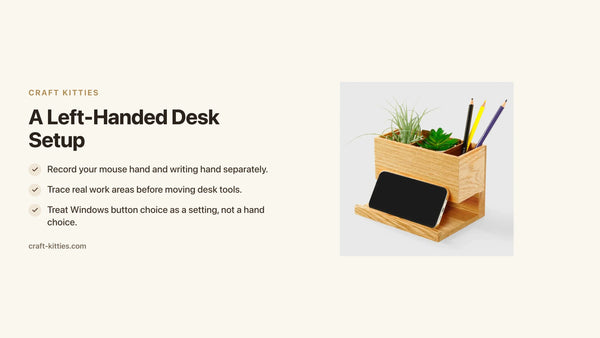
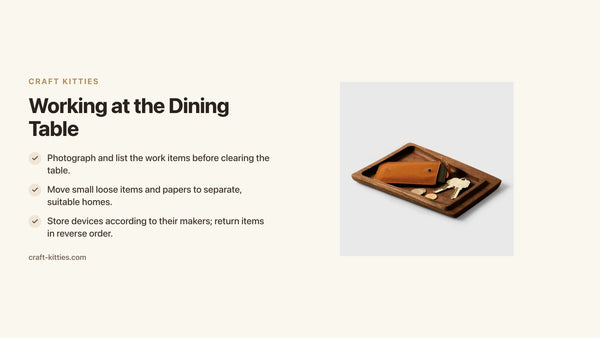
The two-tier valet tray is the highest-leverage organizer on this list. A single-layer tray creates a bounded zone for keys, badges and small accessories; the second layer below it adds storage for a cable, a small notebook or a charging pad without occupying more desk surface. The result is two zones of containment in the footprint of one. Cut from solid red oak or walnut with a fine-sanded finish, the trays are heavy enough to stay put when you reach into them one-handed. Dimensions are sized for a home office use case — compact enough to sit beside a keyboard without competing with it.

Description
The pen tray solves a specific problem: stationery left loose on a desk surface migrates constantly, and stationery stored in a drawer disappears from active use within a week. A flat, open tray keeps pens and pencils visible and reachable without occupying Zone 1. Solid walnut — tight grain, deep brown, furniture-quality surface — means this piece reads as an intentional part of the desk rather than a utility addition. The tray is shallow enough to keep stationery organized without becoming a container for every small object that passes through Zone 2.

Description
The cable organizer box is the most impactful individual change for desks with monitors, laptops, and charging setups. A coiled monitor cable, a USB hub, a phone charger and a pair of earbuds represent four visual elements that each pull attention independently. Contained inside a solid walnut box, they become one clean object at the rear edge of the desk. The lid design lets cables exit from the back, routing to devices without running loose across the surface. Solid walnut construction means the box does not flex, crack or discolor from the gentle heat that builds around power adapters.
Description
A second configuration of the hardwood valet tray turns it into a dedicated carry station: upper tier holds the objects you pick up and set down every time you leave the desk — phone, keys, badge, earbuds — while the lower tier routes the cable that charges them. The effect is a single-object drop zone that eliminates the "where did I put my keys" problem and reduces the Zone 2 surface by consolidating four loose objects into one bounded area.
Description
For desks with both a monitor cable (routed from Zone 3) and a phone or laptop charging cluster (Zone 2), a second cable organizer box keeps the two cable groups separate. Monitor cables route from the rear box at the desk edge; phone and laptop cables route from the Zone 2 box beside the valet tray. The separation prevents cables from different zones from tangling, and keeps Zone 2 visually contained even when the charging setup changes — which it does every time a device is swapped.
Comparison table — desk organizers for a home office
| Organizer | Price | Wood | Zone | Best for |
|---|---|---|---|---|
| Hardwood 2-Tier Valet Tray | $39 | Solid red oak or walnut | Zone 2 | Everyday carry + secondary storage |
| Walnut Cable Organizer Box | $46 | Solid walnut | Zone 3 | Cable and adapter containment |
| Walnut Pen Tray | $39 | Solid walnut | Zone 2 | Stationery — visible and reachable |
Decision matrix — which organizer for which desk problem
| Your primary problem | Start here |
|---|---|
| Cables and adapters are the main visual clutter source | Walnut Cable Organizer Box — $46 |
| Keys, phone and small carry items drift across the desk | Hardwood 2-Tier Valet Tray — $39 |
| Pens and stationery never in the same place twice | Walnut Pen Tray — $39 |
| Full declutter — all three problems at once | Valet Tray + Pen Tray + Cable Box ($124 for the set) |
| Gift for someone who works from home | Hardwood 2-Tier Valet Tray — $39 (versatile, immediate use) |
| Adding a second layer without more footprint | Hardwood 2-Tier Valet Tray — double-layer design |
Why solid wood holds the system better than alternatives
The choice of material for desk organizers is not primarily aesthetic. It determines whether the system stays useful over time or gradually degrades and gets replaced.
MDF and composite board are the default material at most price points. They are light, inexpensive and look fine in photographs. In daily use they flex under load, scratch on the first impact, and swell at corners in rooms with any humidity variation. The MDF organizer that looked structured on week one looks cheap by month six — and by month twelve it is doing the same visual damage as the clutter it was meant to contain.
Plastic organizers are worse over time. They develop a static charge that attracts dust, they yellow under UV from a window or desk lamp, and the fittings that hold compartments together loosen with repeated use. Plastic bins feel like a temporary solution because they behave like one.
Solid red oak, walnut and beech behave in the opposite direction. Red oak is a closed-grain hardwood — dense enough that nothing dents it under the weight of daily objects, with a bold grain and a honey tone that brightens a desk. Walnut is fine-grained, deep brown, and reads as furniture quality at a glance. Beech is pale, tight-grained and Scandi in character — the species that disappears most cleanly into a minimal setup. All three are dimensionally stable under normal indoor humidity variation. They do not flex, do not yellow, and develop a surface patina rather than a surface scratch. A solid hardwood desk organizer is a one-time decision rather than a recurring replacement.
The mistakes that undo a desk declutter
Starting with the organizer, not the zone system. Buying a tray and filling it with whatever was already on the desk moves clutter into a container without removing it. The zone system comes first; the organizer comes second, to house the objects that earned a zone assignment.
Keeping multiples on the surface. Three pens on the desk surface means two pens that do not belong there. One pen on the surface, the rest in a drawer or off the desk entirely. The same logic applies to chargers, notebooks, business cards and sticky note pads. One of each, maximum.
Cable management as an afterthought. Organizing everything else on the desk while leaving cables loose reduces the visual benefit by half. Cable containment belongs in the first pass of the declutter, before any other organizer goes back on the desk.
Treating the declutter as a one-time event. A decluttered desk without a daily reset reverts in three to five days. The reset takes two minutes and requires only that every object has a defined home — which is exactly what the zone system and the organizers provide. The system runs itself once it is set up; the only maintenance is the reset habit.
Overloading Zone 2 with objects that belong in Zone 3. Reference materials, archived notebooks, spare technology accessories and anything you touch less than once a day belong at the rear edge of the desk or off it entirely. Zone 2 is for objects in active daily rotation. Every additional object in Zone 2 reduces the signal clarity of the objects that genuinely belong there.
The daily two-minute reset
The reset is the single habit that determines whether the declutter holds. It takes roughly two minutes and it runs at the same time every day — at the close of the workday, before the screen goes dark.
The sequence is fixed: pen goes into the pen tray, everyday carry goes into the valet tray, cables that came loose during the day go back into the cable box, and any object that drifted during the day goes to its assigned zone or off the desk. The surface ends each day the same way it starts the next morning.
The reason this works, and the reason it is only two minutes rather than a full re-sort, is that every object has exactly one home. The friction of not resetting — the visual noise of a cluttered desk at the start of the next workday — is far higher than the two minutes the reset costs. Once the system has run for two weeks, the reset becomes involuntary: the desk looks wrong when it is not done.
FAQ — decluttering a home office desk
1 — How do I start decluttering my home office desk? Remove everything from the surface first — all of it, without editing as you go. Then define three zones (active work, secondary tools, reference), and return only the objects that belong in each zone. Anything that does not earn a place goes into a drawer, a shelf, or a bin. Starting with a blank surface is more effective than trying to shuffle things around an already loaded desk.
2 — How do I keep my desk tidy after decluttering? A two-minute reset at the end of each workday. Every object returns to its assigned zone — pen in the pen tray, cables in the cable box, essentials in the valet tray. The habit is easy to maintain when every object has exactly one home. Without defined homes, the desk re-clutters within days regardless of how thoroughly it was cleared.
3 — What is the best type of desk organizer for a home office? An organizer that creates vertical layers without consuming extra footprint. A two-tier valet tray stacks without height penalty, a dedicated cable box hides the most visually disruptive clutter (wire coils, dongles, adapters), and a pen tray keeps stationery flat and instantly visible. Solid hardwood pieces — red oak, walnut or beech — hold their form over years of daily use and develop a surface patina that plastic and MDF cannot replicate.
4 — What should not be on a home office desk? Anything you touch less than once a day: spare chargers, archived notebooks, stationery multiples, packaging, loose receipts, and anything you moved there temporarily and never moved back. The desk surface is prime real estate — reserve it for the objects in active daily rotation.
5 — How do I manage cables on a home office desk? A dedicated cable organizer box is the highest-impact single intervention. It hides the coiled cables and loose adapters that account for most desk visual noise. Route cables from the box to devices rather than running them loose across the surface. A solid walnut cable organizer box has the added benefit of looking intentional on the desk rather than like a concession.
6 — What wood species works best for desk organizers? Red oak, walnut and beech are the three solid hardwood species most used for desk organizers. Red oak has a bold grain and a honey-light tone that suits bright setups. Walnut is deep brown with a fine, tight grain — it reads as furniture quality and works against light desks. Beech is pale and Scandi in character. All three are dimensionally stable and hardwearing compared to MDF or bamboo composites.
7 — How many organizers does a home office desk need? Three covers the essentials for most setups: one tray or valet tray for everyday carry and small essentials, one pen or stationery tray for writing tools, and one cable organizer for wire management. Beyond three, the organizers start contributing to the clutter problem rather than solving it.
8 — Is a valet tray useful on a desk? Yes — more so on a desk than anywhere else. A valet tray anchors the catch-all zone: keys, badge, earbuds, wallet, phone when not in use. Objects that would otherwise drift across the surface land in one bounded spot. The two-tier version adds a lower shelf for cables or documents, doubling the storage without adding footprint.
Where to go next
The three organizers in this guide — the Hardwood 2-Tier Valet Tray, the Walnut Pen Tray and the Walnut Cable Organizer Box — cover the three primary problem categories for most home office desks. Browse the full desk organizer collection to see the complete range in solid red oak, walnut and beech.
If you found these pieces through Etsy, where we have 243 reviews from home-office and design-conscious buyers, the full lineup is available directly at craft-kitties.com.
Conclusion
Decluttering a home office desk is not about removing everything permanently. It is about assigning every object a zone and giving it a home it can return to. The zone system (active / secondary / reference) does the thinking once; the daily two-minute reset runs it forward. Solid hardwood organizers — in real red oak, walnut or beech — hold the system physically: they stay put, they do not warp, and they make the reset effortless because every object has a bounded, visible place to land. Set the system up once, reset it for two minutes each evening, and the desk that used to re-clutter by Tuesday stays clear through Friday.