At a glance
- Real solid wood — red oak, walnut or beech — not veneer
- Wall-mounted bars from $22: headphone hanger, cable rail, visual anchor
- Clear desk surface + a plant + one material family — the method, not the shopping list
The work-from-home desk is the room's most contested surface. It accumulates adapters, cables, notebooks and chargers until the object that actually matters — the space to think in — disappears. Most guides respond by suggesting more storage: a second monitor arm, a five-pocket organizer, a pegboard covered in accessories. The result is a busier desk that costs more.
This guide takes the opposite position. A productive home office desk setup is not about adding things — it is about choosing which few things stay on the surface and moving everything else to the wall. The products here are solid hardwood bars and rails, milled from red oak (Quercus rubra), walnut (Juglans nigra) and beech (Fagus sylvatica), finished with wax, priced between $22 and $24, and built for a wall — not for a shelf. They answer the cable problem, the headphone problem and the "it still looks like an office supply closet" problem without covering the desk with more objects.
The principle behind every recommendation in this guide: if something can live on the wall, it should.
Why the desk surface is the bottleneck — not the monitor, not the chair
Ergonomics research focuses on screen height and lumbar support because those two factors drive most musculoskeletal complaints in office workers. Both are valid. But there is a quieter problem that affects concentration even when posture is perfect: visual noise.
A surface scattered with objects — even useful ones — creates a low-grade attentional tax. The eye drifts, the hand reaches for something it did not intend to touch, the mind registers the clutter as an unresolved task list. None of this is dramatic. It accumulates quietly across a six-hour work session, which is why clearing the desk surface often feels more productive than buying a new chair.
The most reliable way to clear a surface permanently is to give its contents somewhere else to live. Not inside a drawer — drawers hide things, which means the next time you need them you spend thirty seconds rummaging. On a wall, in front of you, at the right height, things remain accessible without occupying desk real estate. That is the function a well-placed wall bar serves in a home office: it is not decoration, it is a system.
At a glance
- Real solid wood — red oak, walnut or beech — not veneer
- Wall-mounted bars from $22: headphone hanger, cable rail, visual anchor
- Clear desk surface + a plant + one material family — the method, not the shopping list
The five elements of a home office desk setup that actually moves the needle

Screen height. The monitor should sit so that your eyes land on the top third of the screen when you are looking straight ahead, spine neutral. Most built-in laptop stands and entry-level monitor arms do not get there. A solid wood riser or a properly adjusted arm solves it in minutes and removes the forward head tilt that causes most desk-worker neck tension.
Cable management. A single cable on a desk reads as clean. Four cables read as chaos — regardless of the cables' color or material. Grouping them along a wall-mounted horizontal bar, routing them down the desk leg, and keeping them out of the desk's sightlines eliminates the most persistent source of visual noise in a home office.
Desk surface. The target is a single working layer: keyboard, mouse, a single notebook if you write by hand, and nothing else. Not a stack of notebooks. Not three chargers. Not a lamp with a cord draped across the mat. Everything else — headphones, spare adapters, reference books, stationery — belongs somewhere else.
Lighting. The two failure modes are a screen brighter than the room (causes eye strain) and a task light that creates glare on the screen. Bias lighting behind the monitor costs under $15 and solves the first; a positionable task light at desk level, offset from the screen's reflection angle, solves the second.
Material cohesion. A desk setup where every object is a different material and finish reads as temporary even after years. Choosing one wood species and one metal tone — and applying them to every accessory, from the monitor riser to the cable bar — makes the setup read as intentional. That consistency is the single highest-leverage aesthetic decision you can make in a home office.
Choosing the right wood species for a home office

The three species our studio mills share one important characteristic: all are solid hardwood, not veneer or particleboard. A wax-finished solid wood bar will show scratches as surface marks rather than exposing a paper substrate underneath. It can be lightly buffed and re-waxed if needed. A veneered alternative, kept in a dry heated office, will eventually delaminate at the edges — particularly where cables brush against it daily.
Red oak (Quercus rubra) is light, with a honey tone and a large, visible grain that adds texture to a setup without competing for attention. It suits rooms with white, beige or pale-gray walls, where the wood's warmth provides contrast. Against a dark wall, red oak can read as golden-yellow — something to test with your specific paint before ordering.
Walnut (Juglans nigra) is the most requested species in our lineup for home office applications. Its deep chocolate-brown color with a fine, tight grain reads as quietly sophisticated — not rustic, not corporate. It pairs naturally with matte black monitor stands, anodized aluminum laptops and the neutral charcoal desk mats that dominate current setups. Against a light wall, walnut is what makes the setup read as designed rather than assembled.
Beech (Fagus sylvatica) is the utilitarian choice, and an underrated one. Its near-white color and extremely tight grain make it the most dimensionally stable of the three — it moves the least with seasonal humidity changes, which matters for a bar anchored at two points on a wall. In a minimal or Scandinavian-influenced office, beech disappears into the wall in the best sense: present, structural, not trying to be noticed.
The rule that simplifies the decision: if you already have a warm metal — brass fixtures, gold desk lamp — walnut is your wood. If the room is cooler, more aluminum and matte black, red oak or beech. Match the warmth level of your metal, and the wood will follow.
The wall-mounted bar as home office workhorse
A wall-mounted wooden bar is, at its most literal, a horizontal rod fixed to two brackets. In a bathroom it holds towels. In a home office it does considerably more — and the repurposing requires no modification, no drilling of extra holes, no additional hardware. The bar is the bar; what changes is the context and the objects you hang from it.
The three functions a wall bar serves in a home office, each independently worth the $22–$24 cost:
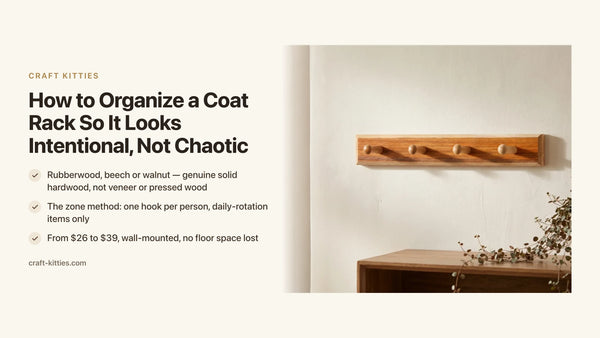
As a headphone hanger. A pair of headphones on a hook behind the monitor keeps them accessible in two seconds and removes the single most common desk surface object that has no permanent home. A wooden bar at the right height keeps the headphones at eye level when not in use — visible, accessible, not buried under a notebook.
As a cable guide. A bar positioned at the back of the desk, just above the desk surface, holds cables horizontally — power, USB hub, display cable — so they run parallel to the desk edge rather than pooling on the floor or draping across the surface. Combined with a simple cable clip or tie, it eliminates the tangle at the source.
As a visual anchor. A horizontal wooden element on the wall directly behind the desk creates a visual frame for the setup — the same function a headboard performs in a bedroom, or a floating shelf in a living room. It gives the eye a surface to settle on and makes the space read as intentional rather than improvised.
The products from our studio, in detail
Four models, all milled from solid hardwood, all wall-mounted, all in the $22–$24 range. They differ in wood species, bracket style and geometry — which affects how they perform in the specific home office use cases above.

Description
The square hardwood bar is the geometric choice: right-angle profile, clean bracket lines, no decorative flourish. At the desk it serves as a cable guide along the back edge or a headphone perch at monitor height. The square profile means cables grip naturally when wrapped around the bar rather than sliding off a round dowel. Available in red oak and walnut; both carry the studio's standard wax finish.

Description
The wood-and-brass set is built for home offices where the metal already speaks a warm language: a brass desk lamp, a gold-tone pen cup, a copper cable tie. The bar's solid wood rail pairs with brass bracket hardware already finished and matched — no hunting for the right screw cap color. At $22 for the set, it is the clearest path to a cohesive warm-metal setup without sourcing each piece separately.

Description
The arc-bracket bar is the functional variant: the curved bracket geometry holds the bar a fraction farther from the wall than a flat-mounted model, which matters when you are routing a thicker cable bundle or hanging a pair of over-ear headphones with a wide yoke. The arc keeps the bar from pinching — cables stay tidy, headphones hang freely. Milled in solid hardwood with the same wax finish.

Description
The double-layer bar is the highest-capacity model in the lineup: two parallel rails, stacked vertically, installed with a single pair of bracket anchors. In a home office the top rail holds headphones; the bottom rail routes cables. Both runs stay independent and visible — no untangling a headphone cord from a USB cable. For a denser setup or a two-monitor configuration where more cables need routing, this is the bar that handles it without a second installation.
Comparison table — which bar for which desk setup
| Model | Price | Wood | Hardware | Best home office use |
|---|---|---|---|---|
| Square hardwood bar | $24.00 | Solid red oak or walnut | Matte | Minimal setup, clean cable routing |
| Wood & brass set | $22.00 | Solid wood | Brass | Warm-metal setup, desk lamp + gold accents |
| Arc bracket bar | $24.00 | Solid hardwood | Matte | Over-ear headphones, thick cable bundles |
| Double-layer bar | $24.00 | Solid hardwood | Matte | Two-monitor config, dual cable runs |
Decision matrix — which bar for your setup
| Your situation | The right pick |
|---|---|
| Minimal setup, one monitor, matte black metal | Square hardwood bar — $24 |
| Warm-metal setup with brass or gold desk lamp | Wood & brass set — $22 |
| Over-ear headphones or thick cable bundle | Arc bracket bar — $24 |
| Two monitors or dense cable setup | Double-layer bar — $24 |
| First upgrade, widest compatibility | Wood & brass set — $22 |
| Gift for a remote worker or recent WFH convert | Square hardwood bar — $24 (neutral, works with any setup) |
How to install a wall-mounted bar in a home office — four steps
1 — Choose the wall and the height. The ideal position for a headphone bar is the wall directly behind or beside the monitor, at a height level with the top of the screen — roughly 20 to 24 inches above the desk surface. For a cable-management bar, position it at the back edge of the desk, just above desk level, so cables run horizontally along the bar and drop straight down the desk leg.
2 — Locate the studs or use appropriate anchors. A bar carrying cables and headphones sits well within the load tolerance of hollow-wall anchors in drywall — but if a stud falls near your target position, use it. Two anchor points per bar are sufficient. Check level before tightening; a bar that is two degrees off horizontal reads as crooked under the parallel lines of a monitor.
3 — Mount and dress. Screw-mounted models take two anchors and about ten minutes. Once the bar is fixed, route your cables along it before hanging headphones — cables go below, headphones above, so neither interferes with the other's removal.
4 — Add one living object. The step that most desk setup guides skip: once the bar is installed and the cables are routed, add a small plant to the desk surface — a succulent in a ceramic pot, placed at the far corner of the desk outside the keyboard zone. It does something no accessory can do: it signals that the space is lived in rather than transactional. A single plant and a clear surface is the difference between a workspace and a setup that photographs well but never quite feels calm.
Mistakes that undermine an otherwise good setup
Matching the wood to the desk photo instead of the actual room. A walnut bar photographed against a white studio background looks warm and dark. On a warm-toned wood desk in a room with amber lighting, it can read as nearly black. Before ordering, hold a walnut object near your desk surface in the room's actual light. The contrast test always beats the product image.
Installing the cable bar on the wrong axis. A bar mounted vertically on the wall beside the desk organizes nothing — cables sag between the bracket points and still pool at the bottom. A bar mounted horizontally, parallel to the desk surface, is what creates a true cable run. The orientation is the function.
Buying one accessory in a different material family. A walnut bar, a pine shelf and a bamboo riser on the same desk surface read as three unrelated purchases, even if each is individually beautiful. Choosing one species and one metal tone for every wall-mounted element is what makes a setup look curated rather than accumulated. Our wooden towel bar collection is organized around this principle — every bar in the same wax-finished hardwood family, so the pieces answer each other.
Treating the bar as storage instead of organization. A bar with eight items on it is a cluttered bar. The function of a wall-mounted bar in a home office is to hold the three or four objects that are used daily — headphones, one key cable, one small hook for a notepad — and nothing else. The moment it becomes a catch-all, it loses the visual silence it was installed to create.
The one-material-family principle
A principle worth naming explicitly, because it is the single most-cited reason setups look finished in photos but chaotic in person: every object on a desk and every object on the wall behind it should belong to the same material family.
That does not mean everything must be identical. It means the language should be consistent. Walnut and black: the bar is walnut, the monitor stand is matte black, the keyboard is matte black, the cable is wrapped in black mesh. Red oak and brass: the bar is red oak, the desk lamp has a brass shade, the pen holder has a brass rim. Beech and chrome: the bar is beech, the monitor arm is silver, the speakers are brushed aluminum.
When materials speak the same language, the eye reads the setup as a decision rather than an accumulation — even without knowing what any individual object costs. That coherence is worth more, in daily working experience, than any single expensive accessory.
The Wall Mounted Wood Towel Bar Holder and the Wood and Brass Towel Rack are the two bars that fit cleanest into the widest range of existing setups — one for cool-metal desks, one for warm. They are the starting point, not the whole setup.
FAQ — home office desk setup ideas
1 — What is the most important element of a home office desk setup? Screen height and cable management are the two highest-leverage changes. A monitor at eye level eliminates the forward head tilt that causes most desk-worker neck tension. A clear desk surface — achieved with wall-mounted organizers rather than drawer stuffing — reduces the visual noise that quietly degrades focus across a full day.
2 — How do I organize cables in a home office without hiding everything? A wall-mounted horizontal bar is the cleanest solution. Cables run along the bar at the back of the desk, grouped by type, and drop straight down behind the desk leg. A solid wood bar at that height also holds headphones — one object solves two problems at once.
3 — What wood finish works best in a home office? A wax or hard-wax oil finish: smooth enough to not catch dust, resistant to coffee spills and hand cream, and easy to buff if scratched. Avoid glossy lacquers — they show fingerprints under monitor light and require full sanding to repair if damaged.
4 — Red oak, walnut or beech for home office accessories? Walnut is the most popular for home office setups: its deep brown, fine grain pairs naturally with matte black and aluminum. Red oak suits warm-walled or lighter rooms. Beech is the most dimensionally stable — ideal for wall-mounted bars that carry regular load.
5 — How do I set up a home office in a small space? Take everything off the desk surface and move it to the wall. Wall-mounted bars hold headphones, cables and small peripherals without claiming any desk real estate. A floating shelf at monitor height handles books and a plant. In a small room, vertical space is the only resource not already spoken for.
6 — Do real wood accessories need special care in a home office? No. Waxed solid wood is low-maintenance by design: a dry cloth removes dust, a barely damp cloth handles spills. No oil treatments or seasonal re-waxing needed. The one rule: no standing water left in contact with the wood — the wax finish handles everything else.
7 — How high should a wall-mounted bar sit in a home office? For headphones: level with the top of the monitor, roughly 20 to 24 inches above the desk surface. For cable management: just above the desk surface at the back edge, so cables run horizontally and drop vertically. The seated eye-line test is the reliable guide — mount where it stays in peripheral view, not directly in your line of sight.
8 — What is a good budget for a home office desk setup upgrade? The highest-return upgrades rarely need the highest spend. A solid wood wall-mounted bar at $22–$24 eliminates cable tangle that affects every work session. A monitor riser solves screen height. Prioritize objects that interact with your eyes and hands every hour. Ergonomic chair and sit-stand desk come after the surface is clear and daily friction is eliminated.
9 — Can I install a wall-mounted bar without drilling? Strong construction adhesive holds a lightly loaded bar on smooth drywall. For a cable-management or headphone bar — where the total load rarely exceeds three to four pounds — adhesive is a viable option in a rental. For a bar that will carry more or that needs to last several years in a permanent home, two screw anchors take ten minutes and are the more reliable choice.
10 — How do I make a home office look professional on video calls? The background matters more than the desk. A horizontal wooden bar on the wall at monitor height, a small plant on the desk, and a clear surface behind the keyboard are what read as intentional on camera. Avoid a wall covered in objects at different heights and depths — it reads as cluttered even in a small video frame.
Where to go next
The wall bar is typically the first solid wood piece in a home office — once it is in place, the other surfaces follow. Our wooden towel bar collection brings together every bar and rail in the same waxed hardwood family. The Square Hardwood Bar is the right starting point for most setups; the Double Layer bar handles the denser two-monitor configurations without a second round of drilling.
If you are building the setup from scratch and want a reference point from buyers who have done the same: we have over 243 reviews on Etsy from customers who brought these pieces into their homes.
Conclusion — the desk is what you remove from it
If this guide leaves you with one method: identify the three objects that live on your desk surface and have no permanent home, then find them a place on the wall. The Wood and Brass Towel Rack set at $22 is the lowest-friction entry point — warm-metal hardware, solid wood rail, two mounting points. The Square Hardwood Bar at $24 is the minimal-setup option, clean enough to disappear into the wall when the job is done. One bar, one afternoon of installation, a different desk.