How to Set Up a Home Office You Love in 2026
There is a difference between a home office that works and a home office you love. Most home offices, even the ones built since 2020, sit somewhere on the works side. The chair is fine. The monitor turns on. The internet reaches the desk. And yet sitting down on Monday morning feels heavier than it should, and standing up at six feels later than it should. The room never quite became a place you wanted to spend eight hours in. It became a place you tolerated for eight hours, which is a very different room.
This guide is about closing that gap. A home office you love is not the result of a bigger budget or a separate room with a view. It is the result of a handful of small, intentional decisions made in the right order — which corner of the home, which desk and chair, where the screen and the lamp go, which plastic pieces become walnut, what objects earn their place on the surface, how you walk in and how you walk out. Most of these decisions cost nothing or very little. Together they change the room from somewhere you go because you have to into somewhere you go because the room itself is part of why the work feels good.
This article is one of the eleven spokes in our 2026 desk series, sitting alongside the pillar guide on ergonomic desk setup. For the systemic ergonomic foundation — screen height, chair geometry, keyboard plane, lighting principles — read that pillar first. This guide layers the emotional, design, and ritual decisions on top of that foundation. For an adjacent angle, the companion piece on five ideas to refresh a home office covers the lighter, weekend-scale version of the same problem.
Why a home office you actually love matters in 2026
Hybrid and fully remote work are now permanent for roughly forty percent of US knowledge workers, according to Stanford's WFH Research tracker. The home office is no longer a temporary arrangement bridging a return to the office; it is the room you sit in more waking hours than any room except, possibly, your bedroom. The choice you are quietly making by leaving it half-finished is the choice to spend most of your waking hours in a room you do not particularly care about. That choice has a cost — not in dollars, but in mood, focus, and the slow erosion of the boundary between work and the rest of your life.
A home office you love does three concrete things. First, it shortens the activation energy required to start work. Sitting down at a room that feels considered makes Monday morning easier in a way that no productivity app can match. Second, it reduces the cognitive tax of visual clutter — the small attention leak that a tangle of cables, a pile of old paper, or a wobbly plastic monitor stand exerts on every minute of the workday. Third, it makes the end of the workday legible. When the room reads as workspace during the day and resting space at night, the work-home boundary holds. When the room reads as vague indoor zone twenty-four hours a day, work spills into evenings and weekends without ever quite ending.
The five layers of a home office you love
A home office you love is built in layers, each one resting on the one below. You can buy out of order — most people do — but the result is more expensive and less satisfying than building in sequence. The five layers below are the ones that consistently produce the strongest emotional return per dollar and per hour spent. Apply them in this order.
1. The right corner — light, quiet, and traffic
The first decision is location, and it is the decision most home offices get wrong by default. A home office goes wherever there is empty space, which is usually a hallway corner, a guest bedroom, or the dining table. That logic optimizes for available square footage and ignores the three variables that actually matter: light, quiet, and foot traffic. The corner you want is the one with natural light from one side (not behind the screen, not in front of it), the lowest baseline noise in the home, and the fewest people walking past your peripheral vision during work hours.
Walk through the home at 10 am, 2 pm, and 4 pm — the three hours when the room will be most heavily used — and pay attention to where natural light hits, where street or upstairs noise carries, and where children, partners, or pets routinely pass. The corner that scores best on all three is your home office, even if it is smaller than the obvious candidate. A four-foot desk in a quiet, well-lit corner outperforms a six-foot desk in a noisy, dim hallway every single day. If no corner of the home meets all three criteria, prioritize light first, then quiet, then traffic — the three rank in that order for daily mood.
2. The desk and the chair — fit before features
The second layer is the furniture, and the rule is fit before features. A desk that is the wrong height for your body height is a desk you will fight for years no matter how many features it has. Standard desk height in the US is 29 to 30 inches (74–76 cm), which is calibrated for someone roughly 5'10". If you are shorter than that, you need a taller chair and a footrest to bring your elbows to keyboard height. If you are taller, either accept that you will need an adjustable chair raised higher or invest in a sit-stand frame that can rise to 32–34 inches when seated. Width and depth matter less than height; a 47-inch by 24-inch desk holds a standard 27-inch monitor, a keyboard, a mouse, and a notebook with room to spare.
The chair is the foundation. A well-fitted chair with adjustable seat height, lumbar support, and adjustable armrests is the single highest-return purchase in a home office, and it can be had for $250 to $450 in 2026 if you shop the used market for office-grade chairs (Herman Miller, Steelcase, Haworth). Below $200 new, chair quality drops sharply; a used premium chair beats a new bargain chair on every metric that matters over a five-year horizon. Once the chair is right, every other ergonomic decision becomes easier because the base of your spine is supported.
3. The screen, the keyboard, and the laptop — eye level first
The third layer is the ergonomic mechanics, and it is where the pillar guide on ergonomic desk setup goes into more depth. The compressed version: the top of the screen should sit at or just below eye level when you are seated upright, the screen should be roughly an arm's length from your eyes (50–70 cm or 20–28 in), the keyboard and mouse should sit at a height that lets your elbows hang at about ninety degrees, and the wrists should stay neutral rather than bent up or down.
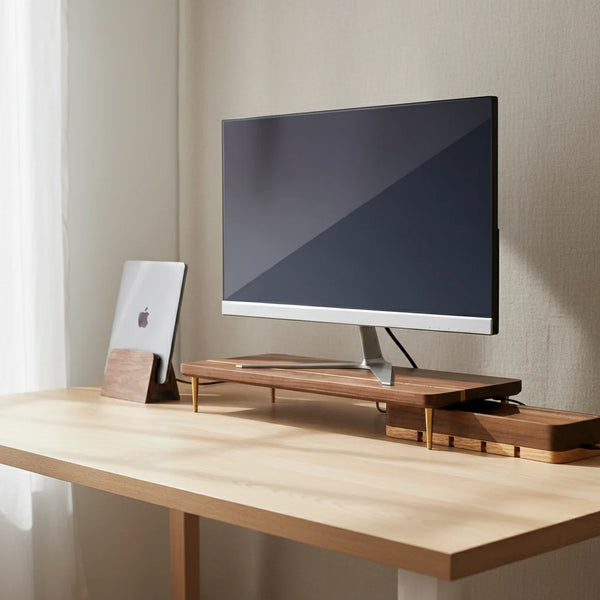
In practical terms, this almost always means lifting the screen. A laptop placed directly on a desk puts the screen six inches below where it should be, and every hour spent looking at it accumulates a forward head tilt that the neck pays for by Friday afternoon. A walnut splicing-wood monitor stand lifts an external display by six centimeters, which is the right adjustment for most users. If you work primarily from a laptop and have only one screen, the answer is not to lower your head — it is to add an external keyboard and mouse and lift the laptop on a stand. If your second screen is the laptop itself, a vertical laptop stand holds it closed in clamshell mode, which simplifies the setup to a single screen at the right height instead of two screens at two heights.
4. The light recipe — warm task light, no screen glare
The fourth layer is light, and it is the one that most home-office advice gets backwards. The default home-office lighting is one bright overhead fixture, usually a daylight-balanced 4000K to 6500K bulb chosen for its brightness. That spec is correct for a workshop and wrong for a desk you want to spend eight hours at. The light a person feels good sitting under is warm (2700K to 3000K), and it comes from beside the screen, not above it. The overhead fixture, if it stays on at all during work hours, should be dimmed.
The recipe is two sources. First, the natural light from the window perpendicular to your screen — never behind, never directly in front. Second, a warm task lamp on your dominant-hand side, aimed at your keyboard and notebook, not at your screen. A 400 to 500 lumen LED bulb in the 2700K to 3000K range is the right spec; anything brighter or cooler reads as harsh. In winter, when the sun drops by 4 pm, the task lamp does the heavy lifting and the overhead stays off. The result is a room that feels warm and lived-in instead of clinical, which is the single largest emotional shift you can make to a home office for under twenty dollars.
5. The boundary — start ritual, end ritual, closed laptop
The fifth and final layer is the one with no price tag and the longest tail. A home office you love is one that turns on and off cleanly. Without that, the room is a place where work happens at 10 am and also at 9 pm and also on Saturday afternoon, and the room never reads as anything other than work zone. With a clean boundary, the room reads as a focused workspace during work hours and as a quiet corner of the home outside them, and both states feel good.
Pick one start-of-work ritual and one end-of-work ritual. The start can be a five-minute walk around the block, a specific playlist while making coffee, or writing a paper to-do list in the same notebook each morning. The end is more important than the start, and it has three concrete steps that we recommend doing every workday: push the mouse back to the keyboard, drop the laptop closed into a vertical stand, and switch off the task lamp. The physical motion of closing the laptop into the stand is the cue that turns the room from workspace to home. Use the same closing sequence for two weeks; by the third week, you will feel the difference when you walk past the desk after dinner. The desk is closed. The day is over. The room is yours again.
The walnut accessories that finish a home office you love
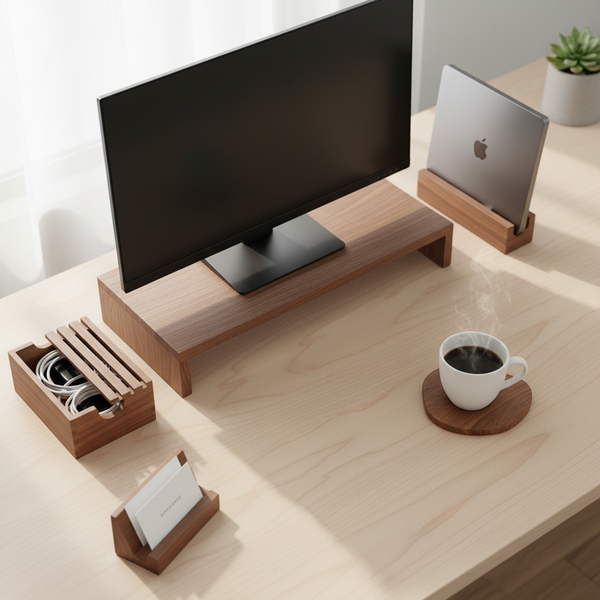
These five pieces from our desk accessories collection are the ones referenced most often in the layers above. Each solves a specific failure listed earlier — screen too low, laptop in the way, cables on the surface, plastic mismatch, drift of small objects onto the work zone.


Comparison table
| Accessory | Price | Which layer | Best for |
|---|---|---|---|
| Walnut Monitor Stand | $89.00 | #3 — Screen at eye level | External 24–32 in display |
| Vertical Laptop Stand | $67.00 | #5 — End-of-day boundary | MacBook + external display |
| Cord Organizer Box | $46.00 | Cross-layer cleanup | Visible power strip + USB hub |
| Additional Riser Leg | $12.50 | #3 — Add 4 cm if still low | Tall users (6 ft +) |
| Business Card Holder | $24.00 | Cross-layer cleanup | Anyone giving cards weekly |
Decision matrix — what to upgrade first
A complete home office you love is built over a few months, not a single weekend. This matrix tells you which decision pays off fastest given where your current setup is weakest.
| If your current home office feels… | Upgrade next |
|---|---|
| Stuck in a noisy, dim corner | Layer #1 — move the desk to a better corner |
| Built around a cheap office chair | Layer #2 — a used premium chair on the resale market |
| Tiring your neck by 3 pm | Layer #3 — Walnut Monitor Stand |
| Lit by one cold overhead bulb | Layer #4 — warm-white bulb + keyboard-side task lamp |
| Bleeding work into your evenings | Layer #5 — Vertical Laptop Stand + closing ritual |
Common mistakes that keep a home office from becoming one you love
Four patterns show up almost every time a home office stays in the works but doesn't feel like home zone. They are worth checking once a quarter.
Choosing the corner by available square footage. The biggest single mistake is letting the empty corner of the home decide where the desk goes. The corner you want is the one that scores on light, quiet, and traffic, not the one with the most empty space. A smaller desk in a better corner outperforms a larger desk in a worse corner every day of the week.
Buying a new desk before fixing the chair. Desks are visible and chairs are not, which is why most home-office budgets get spent on desks first. This is the wrong order. The chair is what you actually touch for eight hours; the desk is what you put things on. A $250 used premium chair under a $200 IKEA desk beats a $200 bargain chair under a $1,200 hardwood desk on every health and comfort metric over a five-year horizon.
Treating the screen height as good enough. A laptop placed flat on the desk produces a 30-degree forward neck flexion that the body pays for. Even people who know this often skip the monitor stand because the laptop "feels fine" for the first hour. The cost is delayed and cumulative; by Friday afternoon, the neck remembers. Fix the screen height even if your current setup feels acceptable on a Monday morning.
Never defining the end of the workday. The single most common reason a home office never becomes one you love is that it never turns off. Without a closing ritual — the closed laptop in a vertical stand, the lamp switched off, the chair pushed in — the room is on twenty-four hours a day, and rooms that never turn off do not become rooms anyone loves.
FAQ — setting up a home office you love
1 — How much does it cost to set up a home office you actually love? Roughly $400 to $1,500 depending on whether you reuse existing furniture. The split that produces the best return: $250–$450 on a used premium chair, $90–$150 on monitor and laptop stands, $40–$80 on cable organization and one walnut accessory, $20 on warm bulbs and one plant. The desk itself can be a $150 IKEA piece if the surface is flat and the right size; the chair is where the budget should land.
2 — Do I need a separate room for a home office? No, but you need a defined corner. A separate room is convenient — it lets you close a door — but it is not the deciding factor. A corner with good light, low noise, and minimal foot traffic in a shared room outperforms a separate room with bad light and a noisy heating vent. If you have the option of a separate room with good conditions, take it. Otherwise, fix the corner you have.
3 — What is the single most important piece of furniture in a home office? The chair. A well-fitted chair with adjustable seat height, lumbar support, and adjustable armrests is the highest-return purchase in a home office. The desk surface is something the eye stops noticing after a week. The chair is what your spine touches for forty hours a week.
4 — How do I make a small home office feel calm instead of cramped? Compress vertically. A vertical laptop stand turns a 30×20 cm laptop footprint into a 12×12 cm one. A cord organizer box makes the back edge of the desk read as a single clean line. Keep exactly one plant and exactly one personal object — not three, not five. Small desks reward restraint more than large ones.
5 — Should I get a standing desk? Only if you will actually alternate between sitting and standing every 30 to 45 minutes. A sit-stand desk used in one position permanently is a more expensive fixed desk. The ergonomic principles in this guide and in our ergonomic desk setup pillar apply equally to both modes; do not buy a standing desk hoping it will fix posture you have not addressed at a seated height first.
6 — What's the best light setup for a home office? Two sources. First, natural light from a window perpendicular to your screen — never behind, never directly in front. Second, a warm task lamp (2700K–3000K, 400–500 lumens) on your dominant-hand side, aimed at the keyboard and notebook, not the screen. The overhead fixture, if it stays on, should be dimmed. This recipe costs about $15 to set up and changes how the room feels more than any other single $15 you can spend on it.
7 — How do I keep work from spilling into the rest of my home? Define one start-of-work ritual and one end-of-work ritual, and use them every workday. The end matters more than the start. Push the mouse back, drop the laptop into a vertical stand, switch off the task lamp. The physical motion of closing the laptop into the stand is the cue your brain uses to mark the day as over. After two weeks, the boundary holds without conscious effort.
8 — Do wooden desk accessories actually matter, or are they just decoration? Both, if chosen for function. A solid walnut monitor stand does the same ergonomic job as a steel or plastic one — it lifts the screen. The wood adds acoustic damping (less keyboard echo) and visual warmth, and it ages with the room instead of yellowing under sunlight. The functional value is real; the emotional value is what makes the room feel cared-for. Browse the desk accessories collection for the pieces referenced throughout this guide.
9 — How often should I rearrange my home office? Once a year for the layout itself, more often for the small objects on the surface. The five layers above should not need to be redone — they should land once and hold. The drift happens at the surface level: papers accumulate, mugs migrate, cables tangle. A quarterly thirty-minute surface reset is enough to keep the room feeling like one you walked into for the first time on Monday morning.
10 — What plant should I put in my home office? Pick a species that survives a missed watering and low light: pothos, snake plant, ZZ plant. All three handle the dry indoor air of a heated or air-conditioned home and bounce back from a forgotten week. Avoid fussier species (ferns, calathea, fiddle-leaf fig) for a first home-office plant — they will turn sad by month two and add a low-grade guilt to your workspace. One plant is enough; two compete for attention.
11 — Is it possible to love a home office in a rented apartment with no permanent changes allowed? Yes, and it is mostly a question of furniture and lamp choices rather than wall changes. A used premium chair, a $150 desk in a well-lit corner, a monitor stand at eye level, a warm task lamp, a cord organizer box, one plant, one personal object, and a closing ritual. None of these require drilling a hole. All of them move with you when the lease ends. Renters often build the home offices they love faster than homeowners precisely because the budget stays in the movable layer.
Related guides
This article is part of the CraftKitties 2026 desk series. The pillar guide and three companion spokes go deeper on adjacent topics.
- The Importance of an Ergonomic Desk Setup in 2026 — the pillar reference for the ergonomic principles touched on in layer #3.
- 5 Ideas to Refresh Your Home Office in 2026 — the weekend-scale version of the same problem, for an already-functional desk that feels stale.
- The 5 Best Wood Desk Accessories for 2026 — a closer look at the walnut pieces referenced throughout this guide.
Closing — start with the corner, this Saturday
The five layers above are ordered by leverage, not difficulty. The biggest single decision is the first one — which corner of the home — and it is the only one you cannot fix later with a small purchase. Pick the corner this Saturday. Move the desk if it is in the wrong place. Then take the next two months to add the chair, the screen height, the warm task lamp, the walnut accessories, and the closing ritual, one piece at a time.
By the time the last layer lands, you will sit down on a Monday morning at a room that reads as cared for — your light, your screen at the right height, the closed laptop you placed in its stand on Friday evening — and the work that happens at that desk will feel different. Not because the work changed, but because the room finally became one you love. Start with the corner. The rest follows. Browse the desk accessories collection when you are ready for the walnut layer, or begin with the walnut monitor stand — the single highest-return piece in the series.