At a glance
- Solid walnut, beech or red oak — real hardwood, not wood-effect plastic
- Oval, rectangular or bear-shaped: from $19
- Tracks accurately, ages beautifully, requires almost no maintenance
A wooden mouse pad looks like a deliberate choice sitting on a desk. That is partly what makes it interesting — and partly what makes buyers hesitate before purchasing one. Will it actually track? Is it comfortable for hours of work? How does it hold up over months of daily contact? These are reasonable questions, and the answers are more specific than "yes, it works."
This guide goes through every criterion that matters before buying a solid wood mouse pad: how real hardwood performs under an optical or laser mouse, how different wood species age, which shape suits which desk setup, what the glide feels like versus fabric, and what maintenance the surface actually needs. At the end, a comparison table and a decision matrix narrow down the right model for your situation — and a FAQ handles the questions we hear most often.
One point to establish before anything else: this guide covers solid hardwood mouse pads. Not wood-effect resin, not bamboo composite, not a printed film on a foam base — solid walnut, beech or red oak, cut from real wood and finished with a protective oil-wax coat. That distinction is what makes everything else in this guide relevant.
Why solid wood, and not something else

The mouse pad market clusters around two poles: fabric pads designed for maximum friction control, and hard pads — aluminum, tempered glass, resin — designed for speed. Solid wood occupies a genuinely different position.
Fabric pads are comfortable and forgiving. They are also the category that ages worst: the surface pills, edges fray, and any liquid that reaches the base simply stays there. A cloth pad that has been in daily use for two years is a hygiene object, not a desk accessory. Aluminum pads track beautifully and last forever, but they are cold to the touch, reflect harsh under monitor light, and produce an audible click whenever the mouse lifts and lands. They also weigh enough that repositioning them is a deliberate act. Wood-effect resin or printed composite pads look acceptable in product photos and start showing their plastic origin within months: the printed grain chips at the edge, the surface dulls unevenly, and the thickness changes from sleek to cheap.
Solid hardwood ages in the opposite direction. The oil-wax finish develops a slight patina over months of contact — not wear, patina — and the grain, which is real, only becomes more legible over time. If scratches accumulate after years, a light sand and a fresh oil coat restore the surface completely. That is the core argument: a solid wood mouse pad is a long-term object, not a consumable.
How solid wood tracks — the honest answer
The practical question everyone reaches before buying a wood mouse pad is this: will my mouse actually work on it? The answer is yes, with one condition.
Modern optical and laser sensors track on smooth, consistent, matte surfaces without any issue. A sealed walnut surface — fine grain, uniform color, matte finish — reads to an optical sensor roughly the way a neutral-colored hard pad does. In practice, this means tracking accuracy is indistinguishable from a fabric pad for most users. The nuance is finish: a high-gloss lacquer can produce enough reflectivity to confuse some sensors, particularly older optical mice. Our pads use a matte oil-wax finish specifically to avoid this — the surface is smooth but not shiny, which keeps the sensor reading the wood and not the reflection off it.
The glide feel is different from fabric, and worth knowing before you commit. Wood is fast: the mouse moves with less resistance than on a cloth pad, closer to the feel of a glass or aluminum hard pad. Most users adapt in a day or two, and many prefer it — particularly for productivity work where smooth, predictable movement matters more than the fine-grained friction control that gamers optimize for. If you are used to a high-resistance cloth pad and use low DPI settings, expect a brief adjustment period.
Walnut, beech and red oak: choosing the right wood
The species question comes down to three variables: color, grain visibility, and hardness. All three are valid for a mouse pad; the differences are aesthetic and long-term.
Walnut is the most requested finish, and the choice that makes the most sense for a desk that already has warm neutrals — dark wood furniture, leather accessories, matte black hardware. Walnut is deep brown with a fine, tight grain that reads as quiet and refined. Its hardness (around 1010 on the Janka scale) means the surface resists the daily dragging of a mouse without showing wear. Over years of use, walnut develops a slightly richer color — the oil-wax finish oxidizes slowly and the wood deepens. This is the species that looks most deliberate sitting on a desk.
Red oak is lighter — a warm honey tone with a bold, clearly visible grain pattern. Where walnut reads as a furniture piece, red oak reads as a wood object, which is a different kind of statement. It is slightly harder than walnut and just as durable under daily use. On a desk with white, cream or light gray tones, red oak provides contrast without adding visual weight. It also ages well: the grain gets more interesting, not less, over time.
Beech sits between the two: pale and even-toned, with a fine grain that almost disappears against the smooth finish. Beech is one of the hardest European hardwoods and takes an oil-wax finish particularly well — the result is a surface that feels almost silky under the palm. It suits minimal desks and lighter palettes, and it is the least visually dominant of the three species, which is an advantage when the rest of the setup is already busy.
One rule applies to all three: avoid softwoods for a mouse surface. Pine, for instance, is beautiful for many desk objects but too soft for the daily abrasion of mouse contact — it dents under consistent friction in a way that hardwood simply does not.
Oval, rectangular, or shaped: which format for your desk

The shape of a mouse pad changes how it reads on a desk more than it changes how it performs. The tracking surface on oval, rectangular and shaped pads is functionally equivalent — the mouse does not know what the perimeter looks like. The choice is entirely compositional.
Oval pads are the most widely used format in our lineup, and the format that adapts to the most desk configurations. The rounded profile avoids the corner-pointing geometry of a rectangle, which makes it easier to position relative to a keyboard, a monitor stand or a desk lamp without creating visual tension. On a minimal desk, an oval walnut pad reads as an intentional accent; on a busier setup, it stays out of the way visually while doing its job. The oval format also makes the backing more stable — the pad sits flat without any tendency to lift at corners.
Rectangular pads suit wider workflows. If you use both a keyboard and a mouse on the same continuous surface and want a desk mat that unifies the two visually, a rectangular wood pad creates that continuity without the bulk of a full desk mat. It also pairs well with a second monitor: the clean horizontal line of a rectangular pad mirrors the monitor's footprint, and the setup reads as organized rather than assembled.
Shaped pads — bear silhouette, cat silhouette — are the outliers in this lineup, and deliberately so. The functional surface is the same; what changes is the object's presence on the desk. A bear-shaped walnut pad is not a neutral tool. It is something that people notice and ask about, which makes it an excellent desk piece if the setup is a content creator's background, a gift desk, or a room where the objects are expected to have character. The tracking area covers the full body of the silhouette, so there is no functional compromise.
The five models from our studio
Three product families, five configurations, all in real walnut, all starting at $19. The differences are in shape, size and the specific grain selected at cutting.

Description
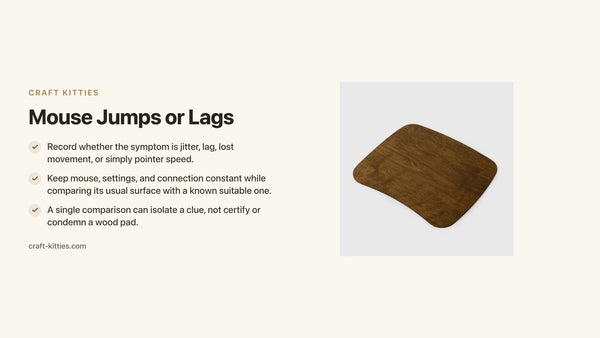
The oval walnut pad is the starting point for most buyers and the format that works in the widest range of contexts. Solid walnut, cut and finished with a matte oil-wax coat that keeps tracking accurate and protects the wood from ambient humidity. The felt backing keeps the pad anchored and protects the desk surface. At $19, it is the entry point to a real wood surface on the desk — without the entry-level look.

Description
The rectangular version of the same solid walnut pad, for desks where the horizontal line matters. It sits flush alongside a keyboard without creating a visual boundary between the two, and its straight edges mirror monitor and laptop lines cleanly. The finish, backing and price are identical — the choice between oval and rectangular is purely about the desk geometry you are working with.

Description
Solid walnut, same finish, cut in a bear (or cat) silhouette. The tracking surface covers the full body of the shape — no dead zones at the edges, no functional compromise. What changes is entirely the object's presence: this pad reads as a designed object rather than a tool, which makes it a natural fit for creative desks, content backgrounds, or as a gift for someone whose setup already has strong aesthetic intent.
Comparison table
| Model | Price | Shape | Wood | Best for |
|---|---|---|---|---|
| Walnut oval | $19.00 | Oval | Solid walnut | Most desk configurations |
| Walnut rectangular | $19.00 | Rectangular | Solid walnut | Wide setups, keyboard pairing |
| Bear or cat shaped | $19.00 | Bear or cat silhouette | Solid walnut | Statement desks, gifts |
Decision matrix — which pad for which situation
| Your situation | The right pick |
|---|---|
| Minimal desk, no strong preference for shape | Walnut oval |
| Wide setup, mouse and keyboard side by side | Walnut rectangular |
| Creative desk or content background | Bear or cat shaped |
| Gift for a desk person | Bear or cat shaped or Oval |
| Replacing a worn cloth pad, want low maintenance | Walnut oval — wipe clean, no replacement cycle |
Maintenance: what solid wood actually needs
A waxed hardwood mouse pad asks for almost no maintenance. Understanding what "almost no" means is worth a minute.
Daily use. The oil-wax finish handles the routine: palm contact, mouse movement, ambient humidity. You do not need to do anything. The surface develops a slight patina from hand contact over months — more warmth, a little depth — which is not damage. It is wood aging the way it is supposed to.
Cleaning. A barely damp microfiber cloth, wiped in the direction of the grain, then dried immediately. That handles dust, skin oil, dry crumbs. For anything stickier — coffee, food — a cloth with a small amount of mild dish soap works; rinse with a damp cloth and dry. Do not let liquid sit on the surface. The finish resists brief contact with moisture; it does not like prolonged exposure.
Annual refresh. Once a year, or when the surface starts to feel dull rather than smooth, a thin coat of furniture wax applied with a soft cloth and buffed off restores the finish completely. This is a fifteen-minute process that returns the pad to its original condition. Fabric pads do not have this option — once they are worn, they go in the bin.
Scratches. Deep scratches from keys or tools can be sanded out with 220-grit paper followed by a fresh oil coat. Normal mouse use — including years of daily movement — leaves no visible marks on solid walnut or beech.
The desk setup context — where wood fits
A wooden mouse pad does not exist in isolation on a desk. The object works best when the rest of the setup gives it a context to sit in.
On a minimal desk — laptop, single monitor, no clutter — a walnut oval pad becomes the desk's warm note. Against a white or light-gray surface, dark walnut grain reads immediately as intentional, and the desk stops looking like a workstation and starts looking like a considered workspace. The pad does not need company; it carries the aesthetic on its own.
On a desk with existing wood elements — a walnut pen holder, a wood monitor stand, a wooden phone dock — the mouse pad becomes part of a visual language rather than a singular statement. In this configuration, matching the species matters: walnut with walnut reads as a set; walnut with beech reads as eclectic. Our wooden desk accessories collection is built around this principle — each piece shares the same finish family so they work together without requiring conscious coordination.
On a content creator's desk or streaming background — where the desk appears in video frames — a shaped pad (bear, cat silhouette) adds a layer of character that is legible on camera. The silhouette reads distinctly even at the scale of a background element, which is something neither an oval nor a rectangular pad achieves with the same impact.
The one context where a wood pad needs a companion object: long daily work sessions involving a lot of mouse movement. The pad itself is excellent for this; but wood provides no wrist cushioning. A thin wrist rest alongside the pad handles that gap without changing the desk aesthetic.
Mistakes to avoid when buying a wooden mouse pad
Choosing based on grain photos from a single product shot. Wood is a natural material, and the grain on the piece you receive will vary from the grain in the photo. That is not a defect — it is what makes each pad unique. If absolute grain consistency matters to you, wood is not the right category.
Assuming a hard surface means less precision. The opposite is more often true. On a smooth, rigid surface, micro-movements register exactly as executed. If your mouse feels erratic on a new wood pad, check your DPI setting before blaming the surface — the tracking is likely more accurate than the cloth pad was, which requires recalibration.
Skipping the felt backing inspection on first use. Before placing the pad, verify the backing is clean and flat. Any debris under the backing creates a pressure point that shows up as a slight rise on the wood surface. A quick wipe of the desk under the pad at first placement avoids this.
Pairing it with a very high-gloss finish desk. A matte or natural wood surface underneath works well. A mirror-gloss lacquered desk creates enough reflectivity that the backed pad can occasionally slide slightly. On those surfaces, a thin non-slip mat under the wood pad is the simple fix.
FAQ — wooden mouse pads
1 — Does a wooden mouse pad work with my optical or laser mouse? Yes. Modern sensors track accurately on a matte, sealed hardwood surface. Our pads use an oil-wax finish rather than gloss lacquer to keep the surface readable by sensors without reflectivity interference. The only mice that may struggle are very old ball-style models, which do not track on any hard surface reliably.
2 — Is it comfortable to use for hours? It is a hard surface, so wrist cushioning comes from the pad underneath your palm, not the pad itself. If you rest your wrist on the desk while mousing, pair the wooden pad with a thin wrist rest. If you use a lifted wrist grip, the question does not apply. The glide is fast and consistent — most users find it comfortable after a short adjustment.
3 — What wood is best? Walnut for warm, rich desks — fine grain, deep brown, ages beautifully. Red oak for lighter desks where you want visible contrast. Beech for minimal setups where the surface should almost disappear. All three are solid hardwoods and track equally well.
4 — How do I clean it? Barely damp microfiber cloth, wipe with the grain, dry immediately. For stickier spots, a small amount of mild soap. No harsh cleaners, no soaking. Annual furniture wax keeps the finish fresh.
5 — Do wooden mouse pads scratch from daily use? Not from mouse movement — solid walnut and beech are dense enough to withstand daily contact without marking. Objects dragged hard across the surface (keys, tools) can scratch it. Those scratches are restorable with fine sandpaper and a fresh oil coat.
6 — Which shape should I choose? Oval for most setups — it integrates without asserting itself. Rectangular when you want a unified keyboard-and-mouse surface. Shaped (bear, cat) when the desk is a creative or gift context and you want the pad to read as an object.
7 — Will it slide on my desk? No. The felt backing creates enough grip on the desk surface to keep the pad in place under normal use. On an unusually smooth or polished desk, a thin non-slip mat under the pad eliminates any residual movement.
8 — Is a wooden mouse pad a good gift? It is one of the more considered desk gifts available at this price point. A real walnut pad at $19 looks like it cost significantly more, it is something the recipient is unlikely to have bought themselves, and it changes the look of the desk in a way that is immediately visible. Browse our walnut wood mouse pad — oval or the bear or cat shaped pad for the gift that makes an impression.
Where to go next
A wooden mouse pad is often the first piece that shifts a desk from functional to deliberate — and rarely the last. Our wooden desk accessories collection covers the objects that naturally answer each other: pen holders, organizers, phone stands and charging docks in the same walnut and red oak families, finished with the same oil-wax care. If you found us through Etsy, where our studio has collected over 243 reviews, the full lineup is available here with the same attention to material and finish.
Conclusion — worth it if you are keeping it
A wooden mouse pad is not for everyone. If you prefer a thick foam wrist rest under your palm, want a surface with high friction, or change your pad every six months, fabric remains the practical call. But if you work at a desk you care about, plan to keep your setup for years, and want surfaces that age better than they arrive — solid walnut, beech or red oak is the answer to the question in the title. At $19 for real hardwood, the oval walnut pad is the lowest-friction starting point. The rectangular version follows if the keyboard-pairing argument applies to your desk. And the bear or cat shaped pad is for the desk that deserves a more interesting object than a rectangle.