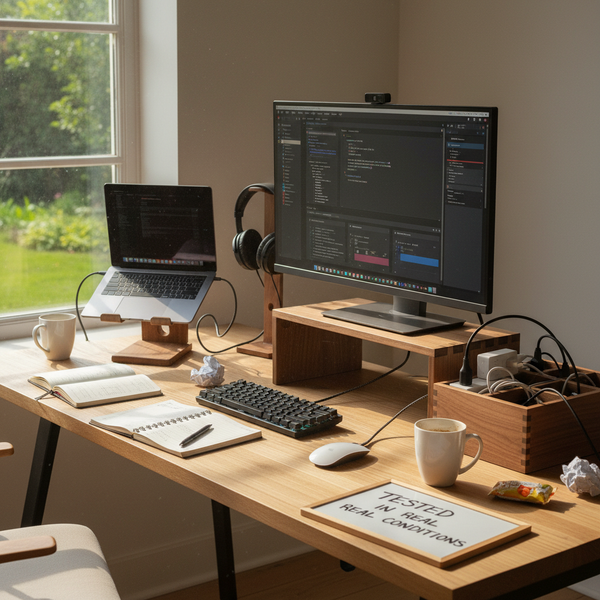
A desk is a tool. The accessories on it shouldn’t fight that — they should reduce friction, hide cables, hold weight, and look like they belong. After a year of testing wooden desk accessories from our desk accessories collection, five pieces stood out. They share the same logic: solid hardwood, restrained design, and a clear job to do.
This guide is for anyone building a minimalist wooden desk setup in 2026 — whether you work from a small studio apartment, a shared home office, or a corner of the kitchen counter that doubles as your workstation. Below you’ll find the five picks, what each is good for, dimensions and material specs, a side-by-side comparison table, a decision matrix to help you choose, and a care guide for keeping hardwood looking new.
At a glance — comparison table
The shortest version of this article is the table below. Pick the row that matches your bottleneck (screen height, cable mess, laptop clamshell, coffee rings, business cards), then jump to that section for the full write-up.
| Item | Price | Material | Best for | Footprint |
|---|---|---|---|---|
| Walnut Monitor Stand | $89.00 | Solid walnut | Neck strain, screen height | 50 × 22 × 6 cm |
| Walnut Cord Organizer Box | $46.00 | Solid walnut | Cable mess, power strip hiding | 23 × 12 × 11 cm |
| Vertical Laptop Stand | $67.00 | Solid walnut | Clamshell setup, small desk | 10 × 10 × 12 cm |
| Walnut Cookie Coaster | $22.99 | Solid walnut | Coffee rings, daily use | Ø 10 × 1.2 cm |
| Walnut Business Card Holder | $24.00 | Solid walnut | Trade shows, card storage | 9 × 6 × 3 cm |
What makes a wooden desk accessory worth keeping
Three criteria filtered the list, and they’re worth stating up front so you can apply the same rules when shopping outside this guide.
Material. Real hardwood — American black walnut, red oak, beech, ash — not veneered MDF or plywood with a hardwood face. Solid wood ages slowly, picks up a patina, and forgives small scratches with a drop of mineral oil. Veneered pieces chip at the edges within a year and can’t be repaired.
Function. Every piece on the list earns its footprint. Decorative wood blocks are everywhere; the items below all solve a specific problem — monitor height, cable mess, coffee rings, business cards, USB clutter. If an object on your desk doesn’t have a daily job, it eventually becomes visual noise.
Form. Minimal silhouettes, no logos on the visible faces, no decorative grooves that collect dust. Artisan wooden desk accessories should disappear into the workspace until you need them — then become exactly the right tool when you do.
1. Walnut Splicing Wood Monitor Stand
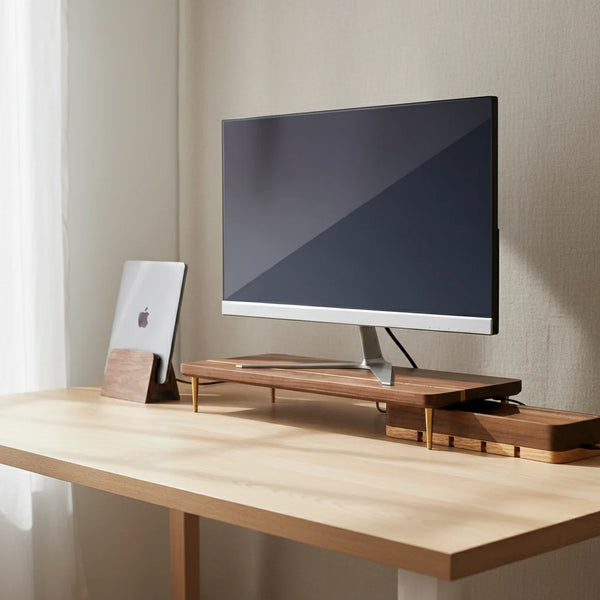
The single accessory that changes a desk the most is a monitor stand. Raising the screen to eye level relieves neck strain almost immediately; the open space underneath becomes a parking spot for keyboards, notebooks, or a closed laptop you’ve docked to an external display.


Specs. 50 cm wide × 22 cm deep × 6 cm tall, in solid American black walnut, weight roughly 1.6 kg, rated to support a 27” monitor (up to about 12 kg) without measurable flex. The splicing pattern — alternating walnut grain orientation across the top — gives the surface visual depth without ornament and hides micro-scratches better than a continuous grain would.
Best for. A single 24”–27” display, a desk between 120 cm and 180 cm wide, and anyone who’s noticed their neck stiffening after a long workday. The 6 cm rise is the sweet spot for most chair-and-desk combinations where the seated eye level lands about a third of the way down the screen.
Use case. Place the stand at the back edge of the desk. Slide a closed MacBook, an iPad, or a slim keyboard into the gap underneath when you need surface space. Pair it with the additional monitor riser leg set if you need an extra 6 cm or 8 cm of height adjustment — useful for taller users or standing-desk converts.
Alternatives in the same family. For lighter rooms or paler woodwork, the Red Oak Splicing Wood Monitor Stand is the identical silhouette in a brighter grain. For dual-monitor setups, the Walnut Dual Monitor Stand at $109 is the wider version designed to carry two 24” displays side by side.
2. Walnut USB Cord Organizer Box
Most desks lose to cables eventually. Phone charger, laptop cable, headphones, a stray USB-C, a power strip — they end up on the floor, tangled behind the monitor, or draped across the back edge of the desk in a way that catches dust and looks worse every week.


Specs. 23 cm long × 12 cm wide × 11 cm tall, solid American walnut, lift-off lid (no hinge), four side cutouts sized for USB-C and barrel power plugs. Interior volume comfortably swallows a six-outlet power strip plus four to six coiled cables. The lid sits flush by gravity — no magnets, no latch — which means you can lift it one-handed without setting your coffee down.
Best for. Any desk with more than two devices charging simultaneously. Particularly effective if your power strip is currently visible on the floor or stuck to the underside of the desk with command strips.
Use case. Run a single power cable from the strip out one of the side cutouts to the wall. Plug everything else inside the box. The top surface becomes a small tray — AirPods case, USB stick, memory card, occasional house keys. At 23 × 12 × 11 cm it sits next to a monitor stand without competing for attention.
Why it earns its $46. Cord organizers come in plastic, fabric, and bamboo — most of them visibly cheap. Solid walnut at this price replaces three or four disposable cable-management gadgets with a single object that improves with age. The walnut darkens slightly over the first year, which is the kind of aging that adds character rather than wear.
3. Vertical Laptop Stand
For anyone running a clamshell setup — laptop closed, external monitor active — a vertical stand reclaims a meaningful chunk of desk space. It also moves the laptop into airflow rather than trapping the bottom plate against the desk surface, which matters more than people realize for sustained-load tasks like video calls or rendering.


Specs. Footprint 10 × 10 cm, height 12 cm, slot width adjustable from 1.0 cm to 1.7 cm via two captive thumbscrews. Carved from a single block of American black walnut with two silicone strips lining the slot. Weighted around 950 g — heavy enough that the laptop stays put when you slide it in or out one-handed.
Best for. Anyone whose MacBook lives in clamshell most of the day. Covers every current MacBook (Air, Pro 14”, Pro 16”) and most ultrabooks. If you switch between desk work and meetings several times a day, the one-handed dock-and-undock motion will save you a few seconds each time, which compounds.
Use case. Park the stand to the right of the monitor stand, slot the closed laptop in, plug in the dock cable. When you head to a meeting, lift the laptop free without unplugging anything else (assuming a USB-C dock with a captive cable). Coming back, drop it in and you’re docked. The silicone strips have prevented every aluminum-scratching complaint we’ve seen in the year we’ve been shipping it.
Care note. Leave 2 cm of air on each side of the slot. The laptop chassis vents heat through the sides under load — a cheaper metal stand that grips the chassis tightly is what causes the thermal throttling people sometimes blame on the laptop itself.
4. Walnut Wooden Cookie Cup Coaster
A coaster is a small object that gets used twenty times a day. That makes its design choices matter more than they should — a bad coaster sticks to the bottom of the mug, a worse one drips condensation onto the desk, the worst ones do both.


Specs. 10 cm diameter × 1.2 cm thick, solid walnut, beveled edge for easy pickup, six carved chip divots on the top face that act as drainage channels for cold-mug condensation. Weighted around 85 g. Untreated raw wood — no varnish that would peel or yellow with hot mugs.
Best for. Anyone whose desk routinely sees a mug or a glass of water. Particularly good if you’re tired of the silicone or cork coasters that stain after a week and need replacing twice a year.
Use case. Place one at each work station — keyboard side and reading side, if your desk is wide. The cookie shape reads as deliberate rather than precious, which means guests pick it up without asking. The divots channel condensation away from the mug bottom, so the coaster never sticks to the mug when you lift it (a small problem that becomes infuriating after the third time).
A note on warmth. A desk made of glass, aluminum, and plastic benefits from one warm material in the daily-touch zone. The coaster is the cheapest way to add that warmth — a small piece of hardwood you touch dozens of times a day. After six months it darkens slightly from skin oils where you grip it, which is the patina people pay extra for on leather goods.
5. Walnut Business Card Holder
The pitch for a business card holder in 2026 is admittedly soft — most exchanges happen via AirDrop or LinkedIn QR. But the object still has a job at trade shows, client meetings, gallery openings, and as a place to park the cards you collect rather than the cards you give.


Specs. 9 cm wide × 6 cm deep × 3 cm tall, solid walnut, single CNC-milled slot tilted forward at about 15° so cards are visible at a glance. Capacity is roughly 25 standard 85 × 55 mm cards. Weight around 110 g — enough that the holder stays put when you pull a card without sliding it across the desk.
Best for. Anyone who still distributes physical cards (designers, photographers, freelancers, anyone working in industries where the handoff matters), or anyone with a desk where the holder will display a small stack of cards from someone whose contact they want to keep visible.
Use case. Park it at the back-right of the desk near the monitor stand. Stack your own cards facing inward, leave a slot for the cards you collect. At trade shows and client meetings it doubles as a precise prop — a $24 wooden object signals more thought than a plastic clip or a paper sleeve. Also works for tarot decks, transit cards, memory cards, or anything roughly the same dimensions.
Pairing. If your desk leans paler, the beechwood business card holder on our CK FR catalogue is the same silhouette in a lighter grain. (US shoppers: contact us if you’d like us to source the beechwood version.)
How to choose — decision matrix
You don’t need all five. Most desks need two or three. Use this matrix to figure out which.
| If you have… | Start with |
|---|---|
| A small desk (under 120 cm wide) | Vertical Laptop Stand + Cord Organizer Box |
| A clamshell setup (laptop + external monitor) | Monitor Stand + Vertical Laptop Stand |
| A dual-monitor setup | Walnut Dual Monitor Stand + Cord Organizer Box |
| Neck strain at the end of the day | Monitor Stand + Riser Leg for fine-tuning |
| Cables draped behind the desk | Cord Organizer Box only — solves it in one buy |
| A glass or aluminum desk with no warmth | Cookie Coaster first, then upgrade |
| A client-facing desk in a studio or office | Card Holder + Monitor Stand |
Order of priority if you’re buying one at a time. Monitor stand first (largest visible change, biggest comfort impact), cord organizer second (clears clutter immediately), laptop stand third (frees surface area), coaster and card holder last (refinement, not foundation).
How to care for wood desk accessories
Solid hardwood asks for very little. Get these four things right and the pieces stay good for a decade or more.
Day-to-day. Wipe with a barely-damp microfiber cloth, dry immediately with a dry cloth. Avoid leaving water rings — wood absorbs moisture and dries in patches if you let it pool.
Once or twice a year. Rub a small amount of food-safe mineral oil or a beeswax-based wood conditioner into the grain with a lint-free cloth. Let it sit for ten minutes, then buff off the excess. Walnut drinks in oil and darkens slightly each time, which is the patina people pay for on leather goods. Red oak takes oil similarly and brightens the grain definition.
Avoid. Silicone-based furniture sprays (they leave a film that blocks future oiling and dulls the surface), citrus cleaners or vinegar (acidity etches the wood), and direct sunlight. UV will lighten walnut and darken oak over years, which is fine if you want it but worth knowing if you don’t.
Repair scratches. A pencil eraser handles surface scuffs on walnut. Deeper scratches respond to a single drop of mineral oil rubbed in with a fingertip — the oil swells the fiber slightly and the scratch disappears or fades. For dents, a damp cloth and a warm iron over the dent for 5–10 seconds pulls the fiber back up.
Heat and steam. Avoid placing a freshly boiled kettle, an iron, or anything hotter than a coffee mug directly on the wood. The coaster handles mug heat indefinitely; the monitor stand and laptop stand handle electronics heat (laptop chargers, dock heat) without any change. Steam from a humidifier within 30 cm will eventually raise the grain — keep wood pieces outside the direct steam plume.
FAQ
What are the best wooden desk accessories for a minimalist setup? Start with a monitor stand and a cord organizer. Those two pieces solve the largest visual problems — screen height and cable clutter — and create the foundation for everything else. Add a coaster next, then a laptop stand if you run clamshell, then a card holder if your work requires it.
How do I care for wood desk accessories? Wipe with a damp cloth, dry immediately, and oil once or twice a year with food-safe mineral oil or beeswax. Avoid silicone sprays, citrus cleaners, and direct sunlight. See the care guide above for repair tips.
Is walnut or red oak better for a desk? Walnut is darker, denser, and ages by deepening in color — it pairs naturally with black, anthracite, or brass furniture. Red oak is paler, with more visible grain, and brightens warmer rooms or Scandinavian-style setups. Both are durable enough for daily desk use; the choice is mostly aesthetic.
Can wooden desk accessories handle heavy monitors? The Walnut Splicing Wood Monitor Stand is rated for 27” displays (up to about 12 kg) without measurable flex. For dual setups, the Walnut Dual Monitor Stand is the wider version designed for two 24” displays side by side.
Are wood desk accessories good gifts? Particularly for anyone who works from home or has recently changed setups. They’re functional, photograph well, and tend to be objects the recipient wouldn’t buy for themselves. The cookie coaster and the card holder are the most giftable single items; the monitor stand is the most thoughtful bigger gift.
Are these accessories real solid wood or veneered? All five pieces in this list are solid hardwood — no veneer, no MDF core, no plywood substrate. The walnut is American black walnut; the red oak is North American. We list the species explicitly on every product page.
Will the wood warp over time? Solid hardwood acclimates to your room’s humidity in the first few weeks, then stays stable. Avoid placing pieces directly above a heating vent or in a window where they alternately bake and cool — those cycles do warp wood. Normal indoor conditions don’t.
Can I oil the wood myself, and what do I use? Yes. Food-safe mineral oil (any brand sold for cutting boards or butcher blocks) or a beeswax-based wood conditioner (Howard Feed-N-Wax is a common one). Apply with a lint-free cloth, let it sit ten minutes, buff off. No special technique required.
Do these ship internationally? We ship from our warehouse to most countries. Shipping costs and lead times vary by destination — check the cart at checkout for the calculated rate. EU shoppers may prefer to order from our French sister store craft-kitties.fr for faster delivery.
What’s the return policy if it doesn’t fit my desk? 30-day returns on unused pieces in their original packaging. Solid hardwood scratches if it’s been on a desk, so we ask that you assess fit and finish before the first use. Contact our customer service if you have any questions before ordering.
A desk you’ll keep using
The five pieces above aren’t a complete setup — they’re the foundation. From here, layer in what your specific desk needs: a wooden ruler for the sketchers and pattern-makers, a paperweight for the note-takers, a plant for anyone whose desk faces a window.
Browse the full desk accessories collection to see the rest, or start with the wooden monitor stand collection if you’re building from the screen outward.
A desk should make work easier. The right wooden accessories — chosen for material, function, and form — do exactly that, and then they stay out of the way.