At a glance
- Photograph and list the work items before clearing the table.
- Move small loose items and papers to separate, suitable homes.
- Store devices according to their makers; return items in reverse order.
A dining table that doubles as a work surface needs a reset between tasks. The useful sequence is item by item: record the current setup, put loose small tools together, protect papers that need to stay, and move devices to their normal storage according to their makers. Then clear the surface for a meal and use the record to rebuild the work setup later.
This is a transfer routine, not a recommendation to carry a laptop in a wooden tray or use a desk organizer for food. Keep food and drinks separate from work items, and follow the care directions for both devices and the table.
Record the current work setup before moving it
Before you start clearing, take a photo of the table from above and make a short list of the items that must return: laptop or monitor, keyboard, mouse, notebook, active papers, charging cable, and small tools. Include any current note about where you stopped in the work. A simple line—“finish the draft after checking the last invoice”—is more useful than a photo of an unexplained screen.
Separate active work from objects that can stay put elsewhere. Do not move a device while it is running or connected in a way its maker says to avoid. Save work, shut down or disconnect devices according to their instructions, and carry each device with a suitable case or by hand. A tray is not device transport or a substitute for protective equipment.
Sort items by how they move
Make four temporary groups: small carryable tools, papers to protect, devices that need their own storage, and items that can remain in place. Put pens, a mouse, or a cable into a small-item tray only if they fit without pressure. Keep loose liquids, food containers, and cleaning products away from work materials.
For papers, decide whether each sheet is an active reference, an unfinished task, or something ready to file. Place valuable or delicate documents in an appropriate enclosure, not loose beneath a heavy tray. Ordinary working notes can go in a folder or notebook that will return to the work spot later.
| Active work item | Carryable small item | Paper enclosure | Device left safely elsewhere | Return sequence |
|---|---|---|---|---|
| Pens and small tools | Group together in a fitting tray or case | None unless a note is attached | Not applicable | Return the tool container before reopening the work area |
| Unfinished note or reference sheet | No loose stacking with cups or plates | Notebook, folder, or suitable document sleeve | Not applicable | Put the note back where the work record says it belongs |
| Laptop or tablet | Carry separately by hand or in its own case | Store papers away from it | Follow the device maker’s shutdown and storage instructions | Set up the device according to the recorded work layout |
| Keyboard, mouse, and cables | Coil or store only as their makers recommend | Keep labels or notes with the cable if needed | Move to a safe shelf or case, not inside a shallow tray | Restore the shared input tools before small desk items |
| Food and drink containers | Keep separate from work items | Not a document enclosure | Not applicable | Remove before rebuilding the work setup |
This table organizes a household routine, not an archival standard or product capacity test. Check actual tray dimensions against the items you plan to place inside. Outside dimensions do not establish the usable interior or show whether an object will fit without sticking out.
Move small items to a known temporary home
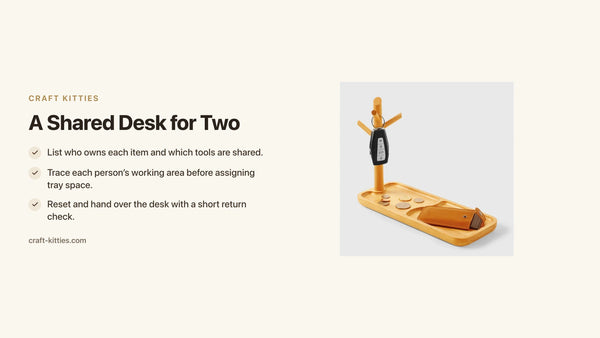
Choose a place near the table where the small-item tray can wait without blocking dining chairs or the walking route. The solid walnut square desk tray is listed at 205 × 150 × 15 mm overall. The walnut pen tray is listed at 210 × 76 × 20 mm overall. Those are outside measurements, not proof of interior fit or a safe way to carry a laptop.
Trace the tray footprint on paper before choosing a place to store it. For the small items, test the actual objects on the tray and make sure they do not overlap or roll off. If a cable needs bending or a mouse protrudes, use a deeper container designed for that item or store it separately.

Description

Description
Protect papers before clearing the table
Keep documents with personal, financial, medical, or other lasting value separate from disposable notes. The Library of Congress’s paper-care guidance recommends clean hands and a clean work area when handling collection materials and cautions against damaging fasteners. Apply that carefully to valuable household documents: place them in a suitable enclosure and avoid leaving them loose on a dining surface. This does not make any wooden tray an archival container.
Put an unfinished note with the notebook or folder that will return to the work session. If the task may resume later, record the next step and the location of any reference sheet. Avoid piling papers under the small-item tray; that makes the first item harder to recover and can hide edges that catch when the tray is moved.
Clear the table and reset it for a meal
Once devices and papers are in their separate locations, clear the remaining work materials from the table. Follow the table maker’s directions before wiping the surface. Do not use an unknown cleaner or wet cloth on a wooden finish. The USDA Forest Products Laboratory explains that finish selection affects cleanability, so care depends on the actual coating.
Use the table for dining only after the work objects are moved and the surface is ready according to its care instructions. Do not treat a desk tray as food-safe serveware simply because a product title includes “serving” or a page says it can sit on a countertop. This article uses the tray only as a small-item organizer during the transition.
Rebuild the work setup in a consistent order
After the meal, start with the photo and the short work note. Clear the surface, restore the device and input tools according to their makers, then put the active paper and small-item tray in the places shown. Return the small tools from the tray to their working positions. Check that the keyboard, mouse path, and writing area are clear before resuming.
If an item is missing, pause and check the temporary home list rather than moving every container. If something has changed on the table, adjust the work setup deliberately and update the photo for the next reset. For broader home office planning, see home office setup ideas and decluttering a home office desk. Those guides cover room organization; this one describes a reversible work-to-meal handoff.
FAQ
Can a desk tray carry a laptop off the dining table?
No. A tray’s listed outside dimensions do not establish a device’s fit, stability, or transport safety. Save and store the device according to its maker, and carry it in a suitable case or by hand.
What should I do with unfinished work papers?
Record the next step and put the papers in a suitable folder, notebook, or document enclosure. Keep valuable papers separate from loose desk accessories and food containers.
How do I remember where everything goes after a meal?
Take a photo before clearing and list the few items that must return, including where you stopped. Rebuild the setup in a consistent order and update the photo if the layout changes.
Can I use a wooden desk tray for food during the meal?
Do not infer food-contact suitability from a product name or finish description. Follow the maker’s instructions for the specific tray and use appropriate serveware for food.